Collector란
OTel Collector는 텔레메트리 데이터를 수신(Receive) → 처리(Process) → 내보내기(Export) 하는 중앙 파이프라인이다. 애플리케이션과 관측성 백엔드 사이에 위치하며, 프로덕션에서는 거의 필수로 사용한다.
Collector 없이 SDK에서 백엔드로 직접 보낼 수도 있지만, Collector를 사이에 두면:
- 애플리케이션 재배포 없이 백엔드를 교체할 수 있다
- 배치 처리, 필터링, 샘플링 등 가공이 가능하다
- 애플리케이션의 네트워크 부하를 줄인다
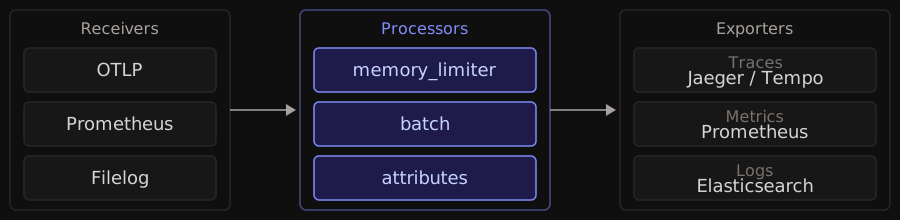
파이프라인 구조
하나의 Collector에 여러 파이프라인을 정의할 수 있고, 각 파이프라인은 traces/metrics/logs 중 하나의 신호 타입을 처리한다.
Receiver (수신기)
데이터가 Collector로 들어오는 입구. Push 또는 Pull 방식.
| Receiver | 방식 | 설명 |
|---|---|---|
otlp | Push | OTLP 프로토콜 (gRPC/HTTP). 가장 기본 |
prometheus | Pull | Prometheus 메트릭 스크래핑 |
jaeger | Push | Jaeger 포맷 수신 |
filelog | Pull | 로그 파일 tail |
hostmetrics | Pull | 호스트 CPU, 메모리, 디스크 수집 |
Processor (처리기)
수신된 데이터를 변환·필터·보강한다. 순서가 중요하다 — 파이프라인에 나열한 순서대로 실행된다.
| Processor | 설명 | 권장 위치 |
|---|---|---|
memory_limiter | 메모리 사용량 제한 (OOM 방지) | 반드시 첫 번째 |
batch | 데이터를 배치로 묶어 전송 | 마지막 |
filter | 조건에 맞지 않는 데이터 제거 | 초반 |
attributes | 속성 추가/삭제/변환 | 중간 |
resource | 리소스 속성 추가 (서비스명, 환경 등) | 중간 |
tail_sampling | 트레이스 완료 후 샘플링 결정 | Gateway에서 |
memory_limiter는 반드시 파이프라인의 첫 번째 Processor로 설정한다. 데이터가 폭증할 때 Collector가 OOM으로 죽는 것을 방지한다.
Exporter (내보내기)
처리된 데이터를 외부 백엔드로 전송한다.
| Exporter | 설명 |
|---|---|
otlp | OTLP 호환 백엔드로 전송 |
prometheus | Prometheus가 스크래핑할 엔드포인트 노출 |
jaeger | Jaeger로 트레이스 전송 |
elasticsearch | Elasticsearch로 로그 전송 |
debug | 디버깅용 콘솔 출력 |
설정 예시
receivers:
  otlp:
    protocols:
      grpc:
        endpoint: 0.0.0.0:4317
      http:
        endpoint: 0.0.0.0:4318

processors:
  memory_limiter:
    check_interval: 1s
    limit_mib: 512
    spike_limit_mib: 128
  batch:
    timeout: 5s
    send_batch_size: 1000
  attributes:
    actions:
      - key: environment
        value: production
        action: upsert

exporters:
  otlp:
    endpoint: tempo:4317
    tls:
      insecure: true
  prometheus:
    endpoint: 0.0.0.0:8889
  elasticsearch:
    endpoints: ["http://es:9200"]

service:
  pipelines:
    traces:
      receivers: [otlp]
      processors: [memory_limiter, batch]
      exporters: [otlp]
    metrics:
      receivers: [otlp]
      processors: [memory_limiter, batch, attributes]
      exporters: [prometheus]
    logs:
      receivers: [otlp]
      processors: [memory_limiter, batch]
      exporters: [elasticsearch]
같은 Receiver를 여러 파이프라인에서 공유할 수 있고, 같은 Exporter도 여러 파이프라인에서 사용할 수 있다.
배포 패턴
Agent 모드
각 호스트/Pod에 사이드카로 배포한다. 애플리케이션과 가까운 곳에서 데이터를 수집하고, 가벼운 처리 후 중앙으로 전송한다.
Gateway 모드
중앙 집중형. 여러 애플리케이션에서 하나의 Collector로 데이터를 보낸다. 라우팅, 집계, 샘플링 등 무거운 처리를 담당한다.
권장: Agent + Gateway 조합
[App] → [Agent] → [Gateway] → [Backend(s)]
로컬 배치 라우팅/필터링 저장/시각화- Agent: 로컬 배치 처리, 메모리 제한, 기본 속성 추가
- Gateway: tail sampling, 라우팅, 멀티 백엔드 내보내기
Collector 배포판
| 배포판 | 설명 |
|---|---|
| Core | 최소 구성. 핵심 Receiver/Processor/Exporter만 |
| Contrib | 커뮤니티 기여 컴포넌트 포함. 대부분의 벤더 통합 |
| Custom | OCB(OpenTelemetry Collector Builder)로 필요한 컴포넌트만 선택 빌드 |
프로덕션에서는 필요한 컴포넌트만 포함한 Custom 빌드를 권장한다. 공격 표면과 바이너리 크기를 줄일 수 있다.
Context Propagation
분산 시스템에서 서비스 A가 서비스 B를 호출할 때, 두 서비스의 Span을 하나의 Trace로 연결하려면 컨텍스트를 전파해야 한다. OTel은 W3C Trace Context 표준을 기본으로 사용한다.

traceparent 헤더
traceparent: 00-4bf92f3577b34da6a3ce929d0e0e4736-00f067aa0ba902b7-01
              │  │                                │                  │
              │  │                                │                  └─ Trace Flags
              │  │                                └─ Parent Span ID (8 bytes)
              │  └─ Trace ID (16 bytes)
└─ Version- Trace ID: 전체 요청을 식별하는 고유 ID. 모든 서비스에서 동일
- Parent Span ID: 호출한 쪽의 Span ID. 부모-자식 관계를 형성
- Trace Flags: 샘플링 여부.
01이면 샘플링됨
전파 흐름
- Order Service가 Span A를 생성 (trace_id=abc, span_id=111)
- Payment Service 호출 시
traceparent헤더에 abc/111 삽입 - Payment Service가 헤더를 파싱하여 Span B 생성 (trace_id=abc, parent=111)
- 두 Span이 같은 Trace에 속하게 됨
자동 계측이 활성화되면 HTTP 클라이언트/서버에서 이 헤더를 자동으로 삽입하고 파싱한다. 개발자가 직접 헤더를 다룰 일은 거의 없다.
Propagator 종류
| Propagator | 헤더 | 설명 |
|---|---|---|
| W3C TraceContext | traceparent, tracestate | OTel 기본. 업계 표준 |
| B3 | X-B3-TraceId 등 | Zipkin 호환. 레거시 |
| Jaeger | uber-trace-id | Jaeger 네이티브 |
| AWS X-Ray | X-Amzn-Trace-Id | AWS 서비스 연동 |
레거시 시스템과 신규 시스템이 혼재할 때는 복합 Propagator로 여러 형식을 동시에 지원할 수 있다:
from opentelemetry.propagators.composite import CompositePropagator
from opentelemetry.propagators.b3 import B3MultiFormat
from opentelemetry.propagate import set_global_textmap

set_global_textmap(CompositePropagator([
    TraceContextTextMapPropagator(),  # W3C
    B3MultiFormat(),                   # Zipkin 레거시
]))
Baggage
Trace Context 외에 사용자 정의 키-값 쌍을 서비스 간 전파하는 메커니즘이다.
from opentelemetry import baggage, context

# 설정 (API Gateway에서)
ctx = baggage.set_baggage("user.id", "user-123")
context.attach(ctx)

# 읽기 (하위 서비스에서)
user_id = baggage.get_baggage("user.id") # "user-123"user.id나 tenant.id를 한 번 설정하면 이후 모든 하위 서비스에서 사용할 수 있다. 단, Baggage는 모든 하위 서비스로 전파되므로 민감한 정보를 넣으면 안 된다.
핵심 정리
- Collector: Receiver → Processor → Exporter 파이프라인.
memory_limiter를 반드시 첫 Processor로. Agent + Gateway 조합이 프로덕션 권장 패턴 - Context Propagation: W3C Trace Context(
traceparent헤더)로 서비스 간 트레이스를 연결. 자동 계측이 알아서 처리 - Baggage: 서비스 간 사용자 정의 메타데이터 전파. 민감 정보 금지
- 벤더 중립: Collector 설정만 바꾸면 백엔드를 자유롭게 교체할 수 있다